


Users Insisted on Scrolling Backward to Capture — and I Dodged Rewriting the Whole Engine with One Line
Most people who want an iPhone long screenshot — or any iPhone scrolling screenshot inside an app — assume the user scrolls top to bottom. ScrollShot’s stitching engine was originally designed that way too — I wrote up the full story in “How Hard Is It to Stitch Two Screenshots Together? An iOS Long-Screenshot Engine That Made Me Start Over — Again and Again”: record → sample frames at equal intervals → per-frame template matching to compute the offset → find the best seam → crop and stitch. That pipeline is already solid for the top-to-bottom case.
But the real world loves to argue. Users want to capture an iPhone scrolling screenshot of a chat — Messages, WhatsApp, or WeChat — or save the part of a web page they scrolled up to see, exactly the iphone screenshot full page in app scenario people keep asking about — and when recording, their finger slides upward. The content flows backward through the recording: it starts at the bottom of the page and the “end” is actually the earlier content. Feed that straight into the top-to-bottom engine and you get an upside-down image: the visual top is the old content from the end of the recording, and the bottom is the beginning.
This post is about how ScrollShot supports bottom-to-top stitching. The point isn’t a deep algorithm — it’s an extreme design trade-off in how little code it takes.
First, here’s a standard top-to-bottom stitching demo — the reverse stitching we’ll discuss builds directly on top of it:
Top-to-bottom scrolling stitching demo: record once, scroll once, and ScrollShot automatically samples frames, matches the overlap, and stitches a complete iPhone long screenshot.
First Instinct: Build a Separate “Upward Engine”?
The first time I hit this requirement, my instinct was: we already have a downward stitching engine, so why not just write an upward one too?
I quickly talked myself out of it. The core of the downward engine is reverse template matching: take the template from the top of the new frame (img2) and search the bottom of the old frame (img1) to compute the offset. Flip it to upward and nearly every coordinate has to invert — where the template comes from, which way the search scans, how positive/negative offsets are defined, how the overlapping seam region is computed… A 3,000-line engine would mean raising a parallel sibling, each with its own bugs and its own maintenance. Worse, any fix to the downward engine would have to be mirrored in the upward one, or the two would silently diverge.
The Breakthrough: Reverse, Then Reuse
What actually stopped me was a plain observation: the stitching engine doesn’t care how the content “flows” — it only cares which of two adjacent frames is on top and which is below. As long as the frame sequence is ordered by the content’s true timeline, the same algorithm works seamlessly. Bottom-to-top footage is just “out of order.”
So ScrollShot’s approach is: detect the scroll direction first; if it’s upward, reverse the entire frame sequence, then feed it into the existing downward pipeline.
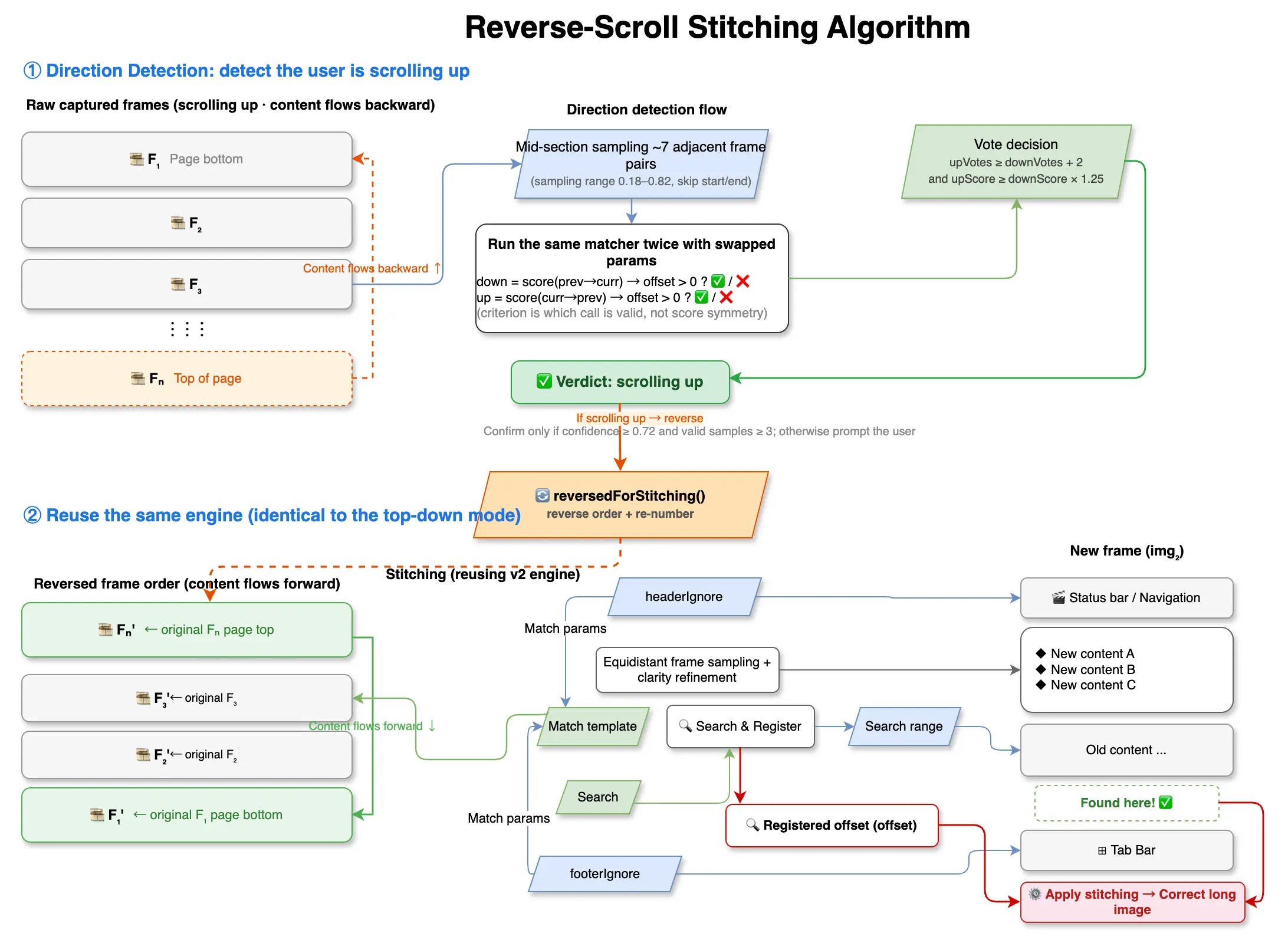
Recording frame sampling (upward scroll, content flows backward):
  [F1 page bottom] → [F2] → [F3] → … → [Fn page top]
                                 │
             ScrollDirectionDetector decides: upward
                                 │
              reversedForStitching() reverses frame order
                                 ▼
  [Fn page top] → … → [F3] → [F2] → [F1 page bottom]
                                 │
              into the same downward stitching engine (zero changes)
                                 ▼
                   correct long image (top → bottom)
The diagram below draws the whole “reverse + reuse” chain — frame sampling, direction detection, frame-order reversal, reusing the downward engine, all the way to the correct long image:
The core code is just one line:
let normalizedBatch = reverseFrames ? batch.reversedForStitching() : batchreversedForStitching() reverses the extracted frame references and renumbers them; everything else stays untouched. After the reversal, the “backward-flowing” content becomes “forward-flowing” again, and the template matching, NCC, and seam logic downstream don’t need a single line changed. Zero new stitching code.
⚠️ Trap: why “reverse the frame order” and not “add an
isReversedflag inside the engine”? Because the latter turns every coordinate system into two copies of logic — “forward / reverse” — doubling the bug surface area. By moving the transform before the data is fed in, the engine always faces a single world.
Direction Detection: The Only New Code — and It’s Nearly Free
Since we reverse, the precondition is recognizing that the user scrolled upward. If this step is heavy, all the savings above are wasted. ScrollShot’s approach is light, and clever enough to be almost “free” — reuse the existing template-matching engine, just swapping the parameters and running it twice.
ScrollDirectionDetector uniformly samples about 7 pairs of adjacent frames from the middle of the recording (avoiding the recording countdown at the start and the stop button at the end), and for each pair it runs the same matcher twice:
let down = directionalScore(previous: prev, current: cur)  // does prev→cur mean "scroll down"?
let up   = directionalScore(previous: cur, current: prev)  // does cur→prev mean "scroll down"?
The key is the line guard outcome.offset > 0 inside directionalScore. This engine’s reverse matching only returns a positive offset when “the template from the top of the new frame lands lower in the old frame.” So:
- If the real scroll is downward, the forward call
downhits (offset > 0, valid), while the reverse callupcan’t find older content lower in the new frame’s top, so offset ≤ 0, marked invalid, scores 0; - If the real scroll is upward, it’s the opposite:
downis invalid,upis valid.
The criterion for direction is actually “which call is valid,” not that the two scores are symmetric. In my first draft I casually wrote “perfectly symmetric,” until a colleague pointed at it and asked “how can valid and invalid be symmetric?” — that’s the misconception I most want to correct in this post.
After getting each pair’s down / up score, the per-pair scoring itself works like this:
score = probability×0.55 + nccBoost×0.20 + overlapRatio×0.15 + consensusBoost×0.10
score ×= sadPenalty          // the blurrier the overlap, the more the score is discounted
valid score must be ≥ 0.26
Then voting: within a pair, if up ≥ down × 1.25 (or exceeds it by 0.08 in absolute terms), cast one vote upward; otherwise cast one vote downward. Final decision:
upwardVotes ≥ downwardVotes + 2, andupwardScore ≥ downwardScore × 1.25
only then is it treated as upward scrolling. The whole thing runs on low-res thumbnails capped at 320px in a background thread, with almost no perceived impact on total time.
When in Doubt, Hand It to the User
Detection isn’t 100% reliable. A nearly static recording that moved only two or three pixels has a very weak direction signal; reversing recklessly is worse than not reversing. So there’s a gate: shouldAskForReverseConfirmation only triggers when confidence ≥ 0.72 and valid samples ≥ 3 pairs, popping a lightweight confirmation: “We detected you recorded scrolling upward — reverse the stitching?” If the user taps reverse, reverseFrames: true; if they’re unsure, it stitches in the original order. The engine never silently produces a wrong image because it guessed the direction wrong.
The Two Modes Side by Side
| Top to bottom | Bottom to top | |
|---|---|---|
| Recording gesture | finger slides down | finger slides up |
| Frame sampling order | natural timeline | natural timeline (content flows backward) |
| Direction detection | not needed | sample 7 pairs mid-recording, matcher runs twice |
| Stitching engine | original | original (reused after frame-order reversal) |
| New code | — | only direction detection + one-line reversal |
| Fallback | — | prompt for confirmation when confidence is low |
Wrapping Up
Looking back, bottom-to-top stitching has almost no “code of its own” in ScrollShot — it’s completely parasitic on the downward engine. The idea of “normalize the order first, then reuse the same engine” later became our default starting pattern when adding new stitching modes: next time we do horizontal or zig-zag stitching, we’ll most likely still first figure out how to twist the problem back into “one-dimensional downward” rather than starting from scratch.
FAQ: Taking a Scrolling Screenshot in iPhone Apps
Can ScrollShot take scrolling screenshot in iPhone apps like Messages and WhatsApp? Yes. Whether you want an iPhone long screenshot of a webpage or an iPhone scrolling screenshot of Messages and WhatsApp threads, ScrollShot records your screen and stitches the frames automatically. Because it captures by screen recording instead of relying on a system “full page” button, it works inside any app — the iphone screenshot full page in app case people keep asking about.
What if I scroll upward while recording a chat? That’s the whole point of this post. An iPhone scrolling screenshot Messages users love, or a Scrolling screenshot iPhone WhatsApp fans capture by scrolling back up, both mean the content flows backward. ScrollShot detects the upward scroll direction, reverses the frame order, and reuses the same downward stitching engine — so you still get a correct iPhone scrolling screenshot without us rewriting anything.
How is this different from the built-in iOS screenshot? The built-in screenshot can’t always capture a full page inside apps. ScrollShot is built for the iPhone long screenshot and scrolling screenshot scenario: record once, scroll however you like (up or down), and get one seamless long image.
Further Reading
- How Hard Is It to Stitch Two Screenshots Together? An iOS Long-Screenshot Engine That Made Me Start Over — Again and Again — picking 30 keyframes from 1,800 frames, reverse template matching, pyramid NCC search down to a three-tier fallback strategy — a full teardown of ScrollShot’s stitching engine.
- Why Choose ScrollShot? The Ultimate Solution for Seamless iPhone Long Screenshots on iOS — a product perspective on how ScrollShot solves the pain points of iOS long screenshots, including automatic screen-recording stitching, manual stitching, privacy protection, and HD export.